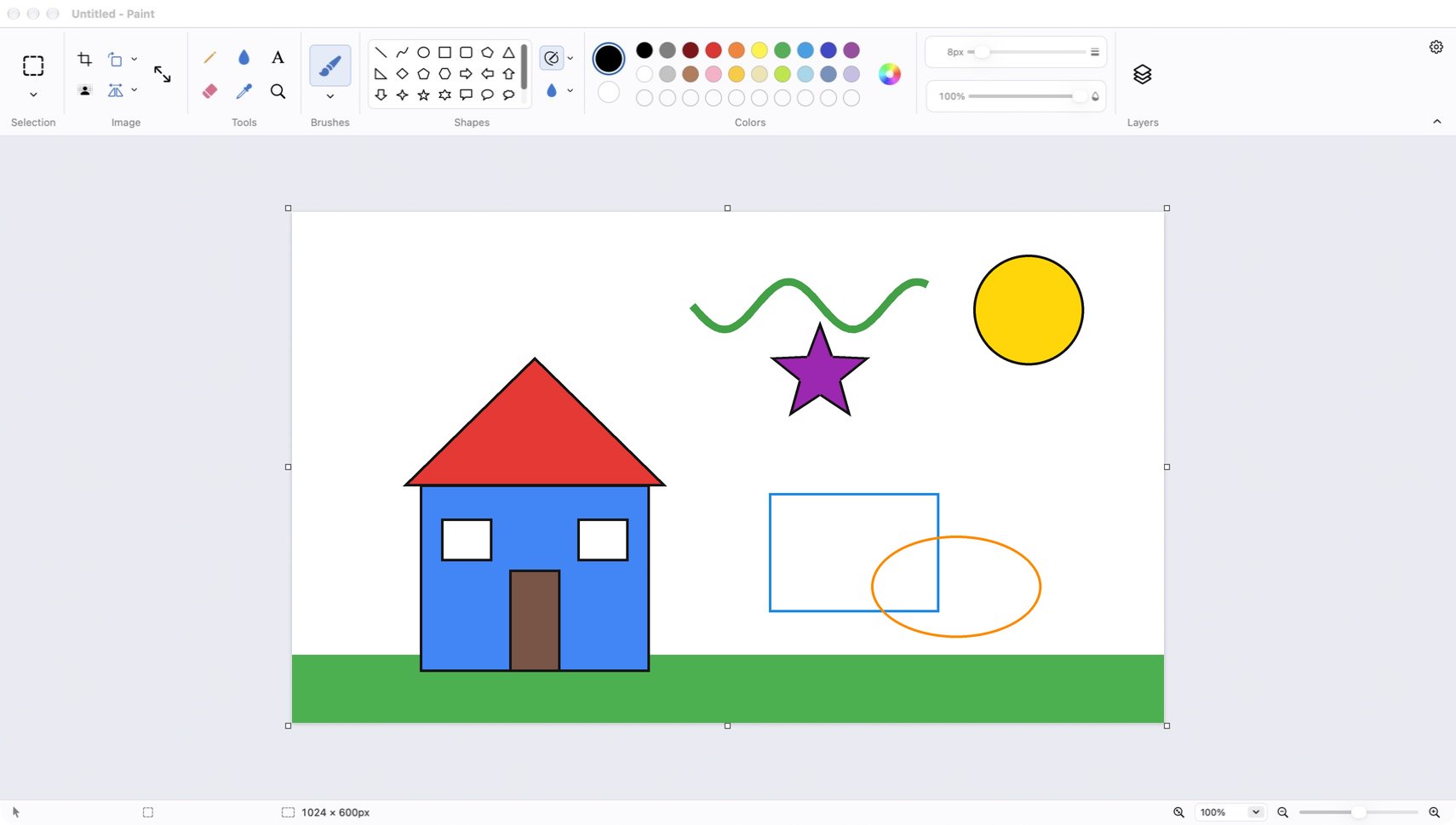
Nine brushes. From calligraphy pen to watercolour, each with a live preview.
Get the highlights.
23 shapes that stay editable. Move, resize and rotate before you commit.
A bucket with clean edges. Fills soft, anti-aliased lines without leaving a white fringe.
Layers when you need them. Reorder, hide, rename and merge. Project files keep them all.
Speaks ten languages. Follows your Mac, or switch instantly from the gear menu.
Runs on every Mac. A Universal app for Apple silicon and Intel, macOS 11 and later.
Fill with colour.
Take it for a spin.
Pick a colour from Paint's own 20-colour palette, then click anywhere on the picture to fill it, just like the paint bucket in the app.
Left-click a colour, then click the picture.
Colour 1
Click the roof, the wall, the sun or the sky.
Shapes.
Bend them to your will.
Draw any of 23 shapes, from arrows and stars to speech bubbles and hearts. Until you press Return, a shape stays live: drag to move it, pull a handle to resize it, or grab the round handle to rotate it, with Shift snapping to 15°.
Outlines let things show through.
By default shapes are outline-only, so whatever you drew underneath stays visible.
Fills cover what's below.
Turn on Shape fill, or click inside a fresh shape with the bucket, and it covers the shapes beneath it.
Brushes.
Nine ways to make a mark.
Every brush has its own character, with size and opacity sliders right next to the palette. Each tool remembers its own size, so switching back is instant.
Image.
Cut, turn, stretch, done.
- Crop to selectionKeep just the part you selected.
- Rotate 90°, 180° or any angleThe whole picture, a selection, or a shape you're still editing.
- Resize and skewBy percentage or exact pixels. Click the canvas size in the status bar to open it.
- Remove backgroundMake the area around your subject transparent in one click.
Languages.
Say it ten ways.
Paint follows the language and appearance of your Mac. Change either from the gear menu and it switches straight away.
English简体中文繁體中文日本語한국어EspañolFrançaisDeutschPortuguês (Brasil)Русский
Light and dark
Matches your Mac, or pick one.
Universal
Native on Apple silicon and Intel.
Six image formats
PNG, JPEG, BMP, GIF, TIFF, HEIC.
How to use.
Your first picture in five minutes.
Shortcuts.
Faster with a keystroke.
- Pencil
- P
- Brushes
- B
- Eraser
- E
- Fill with colour
- F
- Text
- T
- Colour picker
- I
- Select
- S
- Magnifier
- Z
- Shapes
- U
- Swap colour 1 and 2
- X
- Undo / Redo
- ⌘Z⇧⌘Z
- Save
- ⌘S
- Resize and skew
- ⇧⌘R
- Layers panel
- ⇧⌘L
- Show menu bar row
- ⇧⌘M
- Zoom in / out
- ⌘=⌘-
- Fit to window
- ⌘9
- Commit shape or selection
- Return
- Cancel
- Esc
- Keep proportions
- Shift
New to Paint for Mac?
It looks familiar on purpose. The ribbon, palette and tools sit where Windows users expect them.
More canvas, less chrome. The File / Edit / View row starts hidden. Bring it back with ⇧⌘M.
Forty steps of undo. Experiment freely and step back with ⌘Z.
Drag and drop. Drop an image from Finder on the canvas, or paste one from any app.
Why you'll like buying Paint for Mac.
Pay once.
$4.99 and it's yours. No subscription.
No account.
Open the app and start painting. Nothing to sign up for.
No ads.
Just you and the canvas.
Updates through the App Store.
Buy there and new versions arrive automatically.
Every Mac.
Apple silicon or Intel, macOS 11 Big Sur and later.
Your files stay yours.
Standard image formats, saved wherever you choose.
Get Paint for Mac.
 Direct
Download
$4.99Pay once and download the app from this website. Drag it into Applications and start painting.
- Every feature included
- Universal app
- All 10 languages
Mac App Store
App Store
$4.99Buy with your Apple ID and get updates automatically along with your other apps.
- Every feature included
- Automatic updates
- Install on all your Macs
Requires macOS 11 Big Sur or later. Runs natively on Apple silicon and Intel-based Mac computers.
Questions? Answers.
Which Macs does it run on?
Any Mac with macOS 11 Big Sur or later. It is a Universal app, so it runs natively on both Apple silicon (M-series) and Intel Macs.
Is the website download different from the App Store version?
No. Both are the same app at the same price. Choose the App Store if you want updates to arrive automatically with your other apps.
Can I keep layers when I save?
Yes. Use File ▸ Save as project to save a .paintproj file that keeps every layer. PNG, JPEG and the other image formats save a single flattened picture.
How do I change the language?
Paint follows your Mac's language by default. To pick another one, click the gear at the top right of the toolbar and choose Language. The change takes effect immediately.
Where is the File / Edit / View menu row?
It starts hidden to give the canvas more room. Turn it on from the gear menu, from View ▸ Menu bar in the macOS menu bar, or with ⇧⌘M.
Is this Microsoft Paint?
No. Paint for Mac is an independent app made for macOS. It is not made by, affiliated with or endorsed by Microsoft.